
How BigCommerce Backorder Automation Works With Tropicana Wholesale
BigCommerce stores using dropshipping or supplier-based fulfillment often face operational issues when automating backorders. Problems like duplicate webhook events, delayed API execution, and race conditions can lead to duplicate orders, fulfillment errors, and inconsistent order states.
When integrating BigCommerce automation systems with Tropicana Wholesale, the challenge is sending orders automatically and ensuring every order is processed exactly once without duplication or fulfillment errors.
In this blog post, we explain how BigCommerce backorder automation works, including:
- webhook-based order processing
- duplicate webhook prevention
- race condition handling
- idempotent order execution
- scalable fulfillment automation workflows
Understanding BigCommerce Backorder Automation
BigCommerce allows stores to accept orders even when products are temporarily out of stock. These backorders are later fulfilled through suppliers or dropshipping partners like Tropicana Health and Fitness Ltd, UK.
BigCommerce webhook configuration for triggering order automation
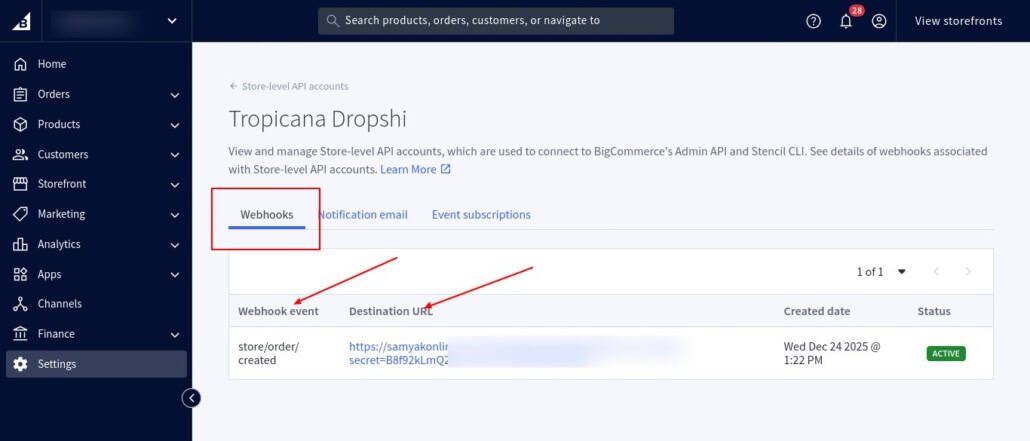
How the Automation Workflow Works
BigCommerce uses webhooks to notify external systems whenever a new order is placed or updated. The automation system then processes the order and sends it to the supplier through the fulfillment API.
This type of workflow is commonly used in BigCommerce dropshipping operations, where supplier fulfillment and inventory synchronization must happen automatically.
A typical workflow looks like this:
- Customer places a backorder
- BigCommerce triggers an order webhook
- The automation server receives and validates the order
- Order is sent to Tropicana Wholesale
- Supplier returns an external order reference
These automated fulfillment workflows often depend on the BigCommerce REST API for managing orders, products, and supplier integrations.
Challenges With Webhook-Based Automation
Webhook events in BigCommerce are not guaranteed to execute only once. In real ecommerce environments, the same webhook may:
- retry automatically
- trigger multiple times
- arrive with delays
- execute simultaneously during high traffic periods
Without proper handling, this can create duplicate supplier orders, fulfillment inconsistencies, and order processing errors.
For stores using automated supplier fulfillment, reliable webhook handling is essential for scalable backorder operations.
The Problem: Duplicate Orders from Webhooks
One of the biggest risks in BigCommerce backorder automation is duplicate webhook execution. BigCommerce webhooks may retry automatically if the server responds slowly, becomes temporarily unavailable, or fails to return a successful response in time.
How Duplicate Webhooks Occur
In real ecommerce environments, the same webhook event may be triggered multiple times for a single order. Without proper validation and execution control, the automation system may process the same order repeatedly.
This can result in:
- duplicate orders sent to Tropicana Wholesale
- repeated fulfillment requests
- incorrect inventory allocation
- duplicate charges
- operational reconciliation issues
Why It Becomes a Bigger Problem at Scale
Duplicate webhook execution becomes more common during:
- high traffic sales periods
- API timeouts
- delayed webhook responses
- large-scale order processing
For ecommerce stores using automated dropshipping fulfillment, preventing duplicate order execution is essential for maintaining accurate and reliable operations.
The Hidden Risk: Race Conditions
Another major challenge in BigCommerce backorder automation is race conditions. This happens when multiple webhook requests for the same order are processed at nearly the same time, often before the previous execution has fully completed.
How Race Conditions Occur
In high-traffic ecommerce environments, BigCommerce may trigger multiple webhook events for the same order within seconds. If the automation system does not properly control execution, both processes may attempt to validate and submit the order simultaneously.
As a result, each process assumes the order has not been processed yet, which can lead to duplicate supplier submissions.
Why This Creates Problems
Race conditions can cause:
- duplicate supplier orders
- inconsistent order states
- incorrect fulfillment records
- inventory synchronization issues
- operational reconciliation errors
These issues become more common during flash sales, API delays, server slowdowns, or large-scale order processing periods.
To maintain reliable fulfillment automation, the system must ensure that only one process can handle an order at a time.
The Solution: Idempotent Order Processing
To prevent duplicate orders in BigCommerce backorder automation, the system must implement idempotent order processing. In simple terms, idempotency ensures that the same order is processed only once, even if BigCommerce triggers the same webhook multiple times.
Before sending an order to the dropshipping supplier, the automation workflow checks:
- whether the order is already being processed
- whether the order was completed earlier
- whether a supplier order reference already exists
If a supplier order reference is already found, the system skips the duplicate request instead of creating another fulfillment order.
By implementing idempotent processing, ecommerce stores can prevent duplicate supplier submissions, maintain accurate order states, and keep fulfillment workflows reliable during high order volumes or repeated webhook events.
Integrating BigCommerce With Supplier (Tropicana Wholesale)
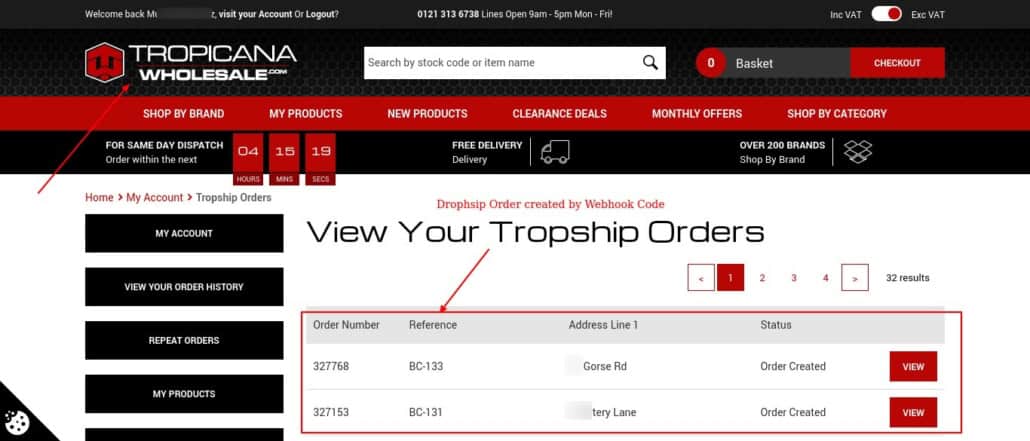
Tropicana Wholesale order processing interface used for dropshipping fulfillment
Tropicana Wholesale provides an API to submit offline orders. Stores managing large product catalogs and supplier-based fulfillment often use BigCommerce development services together with BigCommerce product listing and bulk upload services to automate supplier synchronization and maintain accurate inventory workflows.
Before creating live fulfillment orders, the integration can be validated using:
?validate_only=trueThis helps verify:
- product codes
- order payload structure
- shipping information
- request formatting
Once the validation is successful, the system can switch to live mode and begin creating real supplier orders automatically.
Why Storing the Supplier Order Reference Matters
When Tropicana Wholesale successfully creates an order, the API returns an
offline_order_id.This supplier order reference is important because it:
- confirms the order was created successfully
- helps track fulfillment requests
- prevents duplicate order processing
A reliable automation system stores this supplier order ID and checks it before processing any repeated webhook requests.
Recommended Workflow for Reliable Automation
A reliable BigCommerce backorder automation system should validate, track, and control every order before sending it to the dropshipping supplier. This helps prevent duplicate processing and maintains accurate fulfillment records.
For larger ecommerce operations, these workflows are often integrated into headless BigCommerce commerce solutions to support scalable supplier automation and advanced order orchestration.
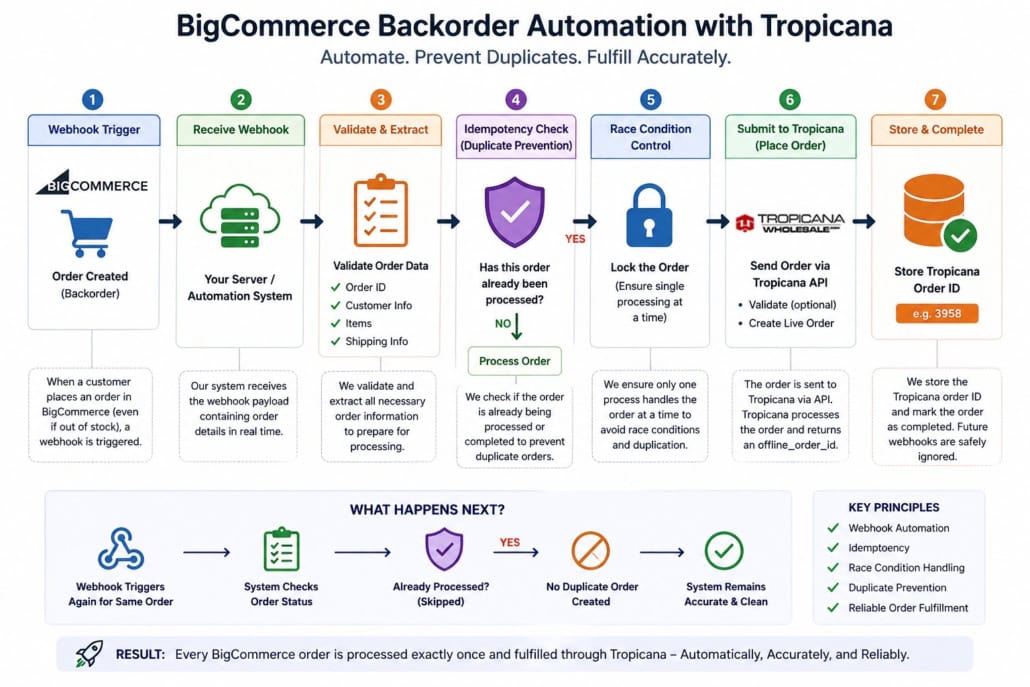
The webhook setup in BigCommerce triggers automation whenever a new order is placed
End-to-End Automation Flow
- Receive webhook from BigCommerce.
- Validate the webhook request to ensure it is legitimate.
- Check whether the order is already being processed.
- If the order is already in progress, skip the execution.
- Check if a supplier order reference already exists.
- If a supplier reference is found, skip the execution.
- Process the order.
- Send the order to Tropicana Wholesale.
- Store the supplier order reference for future validation.
- Complete the execution process.
To prevent simultaneous execution, the automation system should validate order state before processing each webhook request. Supplier order references, processing flags, and request validation checks help ensure the same BigCommerce order is not submitted multiple times during webhook retries or delayed execution scenarios.
Benefits of Automated Backorder Processing
Automating BigCommerce backorder fulfillment with Tropicana Wholesale helps ecommerce stores manage supplier orders more efficiently while reducing manual intervention.
Key benefits include:
- faster order processing
- reduced manual fulfillment work
- prevention of duplicate supplier orders
- improved order tracking and synchronization
- more stable fulfillment operations during high order volumes
This becomes especially important for stores operating multiple catalogs, supplier feeds, or high-volume ecommerce environments using BigCommerce multi-storefront setups.
With proper webhook handling and idempotent processing, stores can maintain accurate fulfillment workflows even as ecommerce operations grow.
Common Mistakes to Avoid
Many BigCommerce automation systems fail because they do not properly handle webhook behavior and supplier order validation.
Common mistakes include:
- assuming webhooks trigger only once
- not handling race conditions during high traffic
- processing the same order multiple times
- failing to store supplier order references
- using validation mode instead of live mode
- skipping webhook and API error handling
Without proper execution control, these issues can lead to duplicate supplier orders, fulfillment inconsistencies, and operational reconciliation problems.
A reliable automation workflow should always validate requests, track supplier order IDs, and prevent duplicate processing before submitting orders to the dropshipping supplier.
Conclusion
BigCommerce backorder automation involves more than simply connecting a store with a dropshipping supplier. A reliable system must handle duplicate webhooks, race conditions, delayed execution, and supplier order validation without creating fulfillment inconsistencies.
By implementing proper webhook handling, idempotent order processing, and supplier order tracking, ecommerce stores can automate fulfillment workflows more reliably and reduce manual operational overhead.
Businesses looking to build scalable supplier automation workflows often require custom BigCommerce development services to manage webhook processing, supplier integrations, and automated fulfillment operations more reliably.
With a scalable automation setup between BigCommerce and Tropicana Wholesale, businesses can process backorders more efficiently, maintain accurate supplier synchronization, and support higher order volumes with greater operational stability.
About Author
Subhash Jain and his team is helping businesses build scalable digital systems, automation workflows, and advanced SEO strategies. If you are dealing with duplicate orders, webhook issues, or manual backorder processing, we can help you implement a reliable automation system with Tropicana Health and Fitness, UK. Get in touch with our team to build a scalable and error-free dropshipping workflow.
FAQs
What is BigCommerce dropshipping automation?
It is the process of automatically sending BigCommerce orders to suppliers like Tropicana Health and Fitness, UK using APIs and webhooks.
How do you prevent duplicate orders in BigCommerce?
By implementing idempotency and handling race conditions so that each order is processed only once.
Why are webhooks causing duplicate orders?
Because BigCommerce webhooks can trigger multiple times or retry on failure, leading to repeated execution.
What is idempotency in order processing?
It ensures that processing the same request multiple times produces the same result, preventing duplicate actions.