
How to Reduce Excessive Abandoned Cart Notifications in BigCommerce Without Losing Sales
Abandoned cart emails are designed to help recover lost revenue. However, many store owners using BigCommerce receive excessive internal notifications caused by casual browsing or automated bot activity.
If you are getting hundreds of abandoned cart alerts every month, the goal is not to disable recovery completely but to control unnecessary notifications while preserving genuine sales opportunities.
Here are practical, built-in methods available inside BigCommerce.
Increase the Abandoned Cart Email Delay
Many stores trigger abandoned cart emails too quickly. A one-hour delay often captures visitors who are still comparing products.
Extending the delay reduces unnecessary alerts and improves email quality.
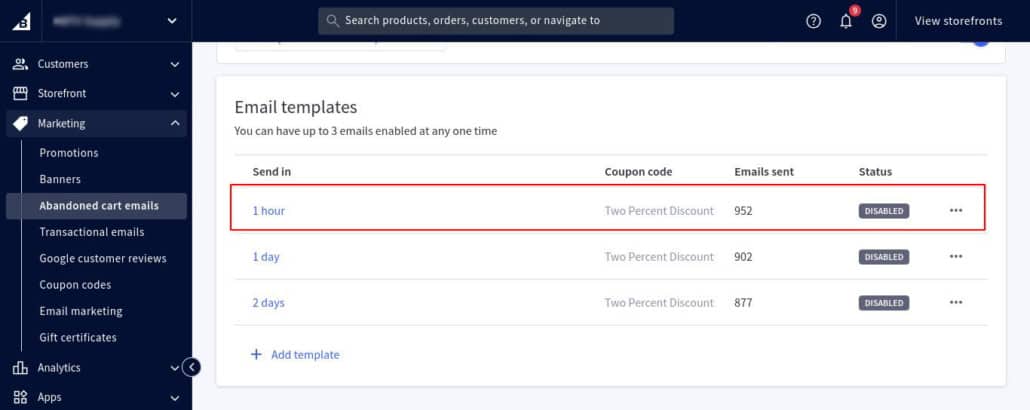
How to Change the Delay Time
- Log in to BigCommerce Admin
- Go to Marketing
- Click Abandoned Cart Emails
- Edit the active workflow
- Change the delay from 1 hour to 6 or 12 hours
- Save changes
This filters out low-intent activity while keeping recovery active for serious buyers.
Disable Admin Abandoned Cart Notifications
If the primary issue is inbox overload, you can disable internal notifications without stopping customer recovery emails.
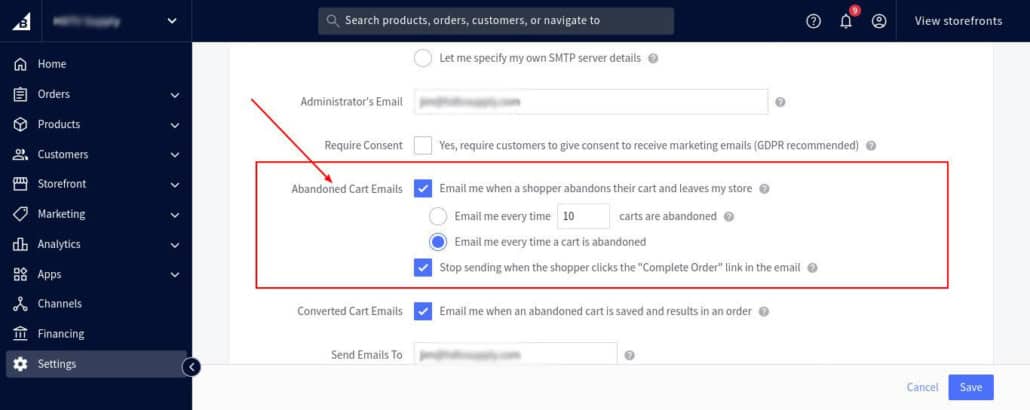
How to Disable Admin Notifications
- Go to Settings
- Click Store Setup
- Select Store Notifications
- Locate abandoned cart related notifications
- Disable email alerts sent to the store owner
- Save changes
This keeps customer automation active while reducing internal noise.
If you prefer to turn off abandoned cart emails entirely:
- Go to Marketing
- Click Abandoned Cart Emails
- Disable the abandoned cart feature
Enable Google reCAPTCHA to Reduce Bot-Generated Carts
A common reason for excessive abandoned carts is automated traffic. Bots often add items to carts without progressing through checkout.
BigCommerce provides built-in spam protection.
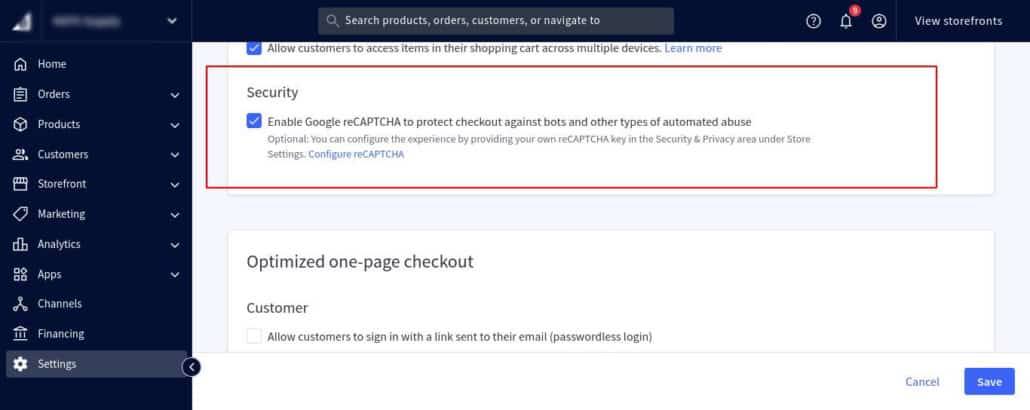
How to Enable reCAPTCHA
- Go to Settings
- Click Checkout
- Scroll to the Spam Protection section
- Enable Google reCAPTCHA
- Save changes
This helps prevent automated scripts from creating fake cart sessions.
How to Identify and Control Bot Traffic Creating Abandoned Carts
Because BigCommerce is a SaaS platform, it does not provide access to full raw server logs inside the admin panel. However, you can still investigate suspicious abandoned cart activity using available tools.
- First, review Orders. Open incomplete or suspicious orders and check the customer IP address. If the same IP appears repeatedly across multiple attempts, it may indicate automated traffic.
- Next, check Analytics and review Cart and Checkout reports. Sudden spikes in cart activity within a short time frame can signal bot behavior rather than genuine shoppers.
For stronger protection, use a DNS-level security layer such as Cloudflare. This allows you to view visitor IPs, block repeat offenders, and apply rate limiting rules. Since BigCommerce manages the hosting infrastructure, an external firewall provides better visibility and control over bot traffic.
Conclusion
Abandoned cart notifications are valuable when properly configured. By adjusting trigger timing, disabling unnecessary admin alerts, and enabling built-in spam protection, you can control excessive notifications without losing legitimate sales opportunities.
FAQs
Q: How does an abandoned cart work in BigCommerce?
A: An abandoned cart is recorded when a visitor adds products to their cart and does not complete the checkout process within a defined time window. If abandoned cart emails are enabled, BigCommerce automatically sends reminder emails based on your configured delay.
Q: How can I fix too many abandoned cart notifications?
A: You can reduce unnecessary alerts by:
- Increasing the email trigger delay
- Disabling admin notification emails
- Enabling reCAPTCHA to block automated cart creation
These changes maintain recovery capability while reducing internal clutter.
Q: How can I reduce checkout abandonment?
A: Checkout abandonment can be reduced by:
- Simplifying checkout steps
- Reducing required form fields
- Offering multiple payment options
- Improving page load speed
In many cases, high abandonment is not technical but behavioral, such as price comparison or shipping evaluation.
Q: How can I track abandoned carts effectively?
A: Inside BigCommerce:
- Go to Analytics
- Review cart and checkout performance reports
- Compare initiated checkouts versus completed orders
This helps identify whether abandoned carts are genuine buying signals or automated activity.
Q: Can I block IP addresses that create spam carts?
A: BigCommerce does not provide direct IP blocking within the admin panel. However, you can:
- Identify repeat IPs through order data
- Use a firewall service at the DNS level
- Enable reCAPTCHA to reduce automated submissions
Manual IP blocking is possible through external security services rather than native BigCommerce tools.
Q: Why am I seeing large abandoned carts from anonymous shoppers?
A: If you notice abandoned carts with 30 to 50 products and unusually high cart values, these are usually automated bots rather than real customers. Bots often add bulk quantities to test pricing, scrape product data, or scan checkout functionality.
If the cart does not include a customer email address and does not reach the payment stage, it is typically automated traffic, not a genuine buyer.
Q: Are anonymous abandoned carts a sign that my store is being hacked?
A: In most cases, no. Large anonymous carts are rarely hacking attempts. They are usually bots interacting with the cart system.
If your admin access, payment processing, and file structure remain unchanged, your store is likely secure. However, enabling reCAPTCHA and bot protection is still recommended.
Q: How can I stop bots from creating fake abandoned carts?
A: You can reduce bot-generated carts by:
- Enabling Google reCAPTCHA
Navigation: Settings → Checkout → Enable Google reCAPTCHA - Increasing abandoned cart email delay
Navigation: Marketing → Abandoned Cart Emails → Edit workflow delay - Using a DNS-level firewall such as Cloudflare to apply bot filtering and rate limiting
These steps significantly reduce automated cart activity.
Q: Can I reset or delete abandoned cart data in BigCommerce?
A: BigCommerce does not provide a direct “reset abandoned carts” button. However:
- You can disable and re-enable abandoned cart emails to refresh tracking behavior
- Anonymous carts without email addresses eventually expire automatically
- You can disable admin notifications to prevent inbox overload
Historical anonymous cart sessions typically do not impact store performance.
Q: How can I tell if abandoned carts are real customers or bots?
A: Look for these indicators:
Bots:
- Add large quantities quickly
- Create unusually high cart values
- Do not enter email
- Do not proceed to payment
Real shoppers:
- Enter an email address
- Progress through checkout steps
- Return within a few hours
Reviewing Orders and Analytics reports inside BigCommerce can help identify patterns.
Q: Do You Need to Set Up DNS at Cloudflare to Use It with BigCommerce?
A: Yes – But Only Basic DNS.
If you want Cloudflare protection for your BigCommerce store, you must:
- Point your domain nameservers to Cloudflare
- Manage your DNS zone inside Cloudflare
This is standard Cloudflare usage.
You do NOT need:
- Cloudflare for SaaS
- Orange-to-Orange configuration
- Enterprise plan
- Platform integration
Those are only for companies building SaaS products.
How It Works with BigCommerce
Cloudflare simply:
- Sits in front of your domain
- Filters traffic
- Blocks bots
- Applies firewall rules
- Enables Bot Fight Mode
BigCommerce continues to host:
- Store files
- Checkout
- Product pages
Think of it as a security gate before traffic reaches BigCommerce.
Simple Setup Flow
- Create free Cloudflare account
- Add your domain
- Cloudflare scans existing DNS records
- Update nameservers at your domain registrar
- Wait for propagation
- Enable Bot Fight Mode
- Create firewall or rate limiting rules
That’s it.
What You Do NOT Need
You do not need:
- Orange-to-Orange (O2O)
- Cloudflare for SaaS
- Any BigCommerce code changes
- Any hosting migration
Q: Do I Need Cloudflare for SaaS or Orange-to-Orange (O2O) to Protect My BigCommerce Store?
A: No.
If you are running a standard BigCommerce store, you do not need Cloudflare for SaaS or the Orange-to-Orange configuration. Those options are designed for large SaaS platforms that resell or embed Cloudflare within their own infrastructure.
Leave a Reply
Want to join the discussion?Feel free to contribute!